
Patch 编写指南
Patch Provider 是一个普通 DSH 插件,通过 package.json 声明一个或多个 CommonJS 模块。Harmony 会在目标插件执行前,从当前 Loader profile 发现这些模块。
Provider 声明
{
  "name": "my-dsh-plugin",
  "dsh": {
    "plugin": {
      "compatibility": {
        "requires": { "base-plugin": "^2.0.0" },
        "conflicts": { "legacy-patches": "*" },
        "integrates": { "optional-renderer": "^1.0.0" }
      }
    },
    "harmony": {
      "patches": ["./patches/answer.patch.cjs"],
      "after": ["base-patches"],
      "before": ["ui-patches"]
    }
  }
}
Patch 文件必须使用 CommonJS。一个模块可以导出一个 Patch 声明或声明数组,以便实时 Loader 更新时同步收集。
如果 Provider 本身依赖 Harmony 服务,使用 DSH 已有依赖机制:
export const inject = ['harmony']或在 Loader 行声明:
- id: my-plugin
  inject: [harmony]
源码 Patch
源码 Patch 选择 TypeScript AST 节点,并通过 MagicString 编辑当前源码:
/** @type {import('dsh-harmony').HarmonyPatch} */
module.exports = {
  id: 'answer-value',
  description: '将 answer() 的返回值改为 42。',
  target: {
    package: 'some-dsh-plugin',
    version: '^1.2.0',
    file: 'lib/index.js',
  },
  select: 'FunctionDeclaration[name.name="answer"] NumericLiteral',
  expect: 1,
  after: ['base-patches'],
  apply({ node, sourceFile, edit }) {
    edit.overwrite(node.getStart(sourceFile), node.getEnd(), '42')
  },
}
select 使用 TSQuery。回调参数包括:
| 字段 | 内容 |
|---|---|
patch | 稳定键与 Provider Owner |
source | 所有早期 Patch 产生的源码 |
sourceFile | TypeScript AST |
node | 当前匹配节点 |
edit | 针对当前源码的 MagicString 编辑器 |
ts | TypeScript 命名空间 |
传给 edit 的位置都以当前 Patch 收到的源码为准。file 是唯一、精确的包内相对路径;version 是 SemVer 范围;expect 要求精确匹配数。
每个 Source Patch 都会先解析早期 Patch 留下的源码,再运行选择器。Harmony 不会让所有选择器预先查询同一棵原始 AST,否则后续选择器看到的节点和偏移量都会过时。
加载器 Patch
当目标包发布的是 TypeScript,而不是 Node 可以直接从 node_modules 执行的 JavaScript 时,使用加载器 Patch:
/** @type {import('dsh-harmony').HarmonyPatch} */
module.exports = {
  id: 'load-published-typescript',
  target: {
    package: 'typescript-only-plugin',
    version: '^1.0.0',
    file: 'index.ts',
  },
  loader: 'typescript',
}
Harmony 使用目标文件检查兼容性并报告状态。Patch 绑定后,它会在 Node 默认加载器运行前转译该包内的 .ts、.tsx、.mts 和 .cts 模块,不改变其它包的加载方式。
如果还需要修改 TypeScript 源码,请另行声明源码 Patch。精确到文件的源码 Patch 会先修改当前模块,加载器 Patch 再转译它以及包内的 TypeScript 依赖。
语义 Patch
具名函数声明和类方法可以直接装饰,无需手写 AST 编辑:
module.exports = {
  id: 'answer-after',
  target: {
    package: 'some-dsh-plugin',
    version: '^1.2.0',
    file: 'lib/index.js',
    function: 'answer',
  },
  operation: 'after',
  handler({ result }) {
    return result + 1
  },
}| 操作 | 行为 |
|---|---|
before | 目标执行前运行,可返回替换参数数组 |
after | 目标执行后运行,可替换同步或异步结果 |
around | 通过 invoke(args?) 控制下一层是否及如何执行 |
replace | 通过 invoke(args?) 替换目标;同一函数只能有一个启用的 Replace |
所有 before 按 Patch 顺序执行;around 与 replace 按顺序形成由外到内的链;所有 after 再按 Patch 顺序执行。源码 Patch 与语义 Patch 共享同一全局 Patch 顺序。
语义目标当前要求具名参数,不支持 Generator。处理器在 Node.js 中执行,因此 lib/client.js 等浏览器目标必须使用源码 Patch。
组合 Patch
多个普通 Patch 必须共享排序、启停和成功失败时,使用组合 Patch:
module.exports = {
  id: 'feature-set',
  after: ['base-patches'],
  patches: [
    {
      id: 'host-part',
      target: { package: 'target-plugin', version: '^1.0.0', file: 'lib/index.js' },
      select: 'StringLiteral[text="old"]',
      expect: 1,
      apply({ node, sourceFile, edit }) {
        edit.overwrite(node.getStart(sourceFile), node.getEnd(), JSON.stringify('new'))
      },
    },
    {
      id: 'client-part',
      target: { package: 'target-plugin', version: '^1.0.0', file: 'lib/client.js' },
      select: 'StringLiteral[text="old"]',
      expect: 1,
      apply({ node, sourceFile, edit }) {
        edit.overwrite(node.getStart(sourceFile), node.getEnd(), JSON.stringify('new'))
      },
    },
  ],
}
组合 Patch 只有一个稳定键、一个 patchOrder 位置和一个开关,成员仍按声明顺序运行。提交前,Harmony 会在各自目标上尝试每个成员;只要有一个无法绑定或应用,整个组合都不应用。成员不会预先查询同一份原始源码,后一个仍会读取前一个的结果。
顺序约束
before 和 after 指向 Provider 包名,是排序约束而非 npm 或 Cordis 依赖。
package.json中的 Provider 级规则默认作用于其全部 Patch。- 单个 Patch 只要定义
before或after,就会覆盖而不是追加 Provider 全局规则。 - 最终全局
patchOrder可以交错不同 Provider 的 Patch。 - 没有用户覆盖时,声明顺序仍是稳定 Tie-breaker。
用户顺序优先。自动排序会寻找违反规则最少的结果,并在多个结果相同时保留现有相对顺序。互相矛盾的规则会继续显示为警告,Harmony 不会用数值优先级把它们隐藏起来。
移动 Provider 会把它的 Patch 重新放到一起;直接修改 patchOrder 则保留用户选择的跨 Provider 位置。无论哪种方式,Source Patch 都会读取前一个 Patch 的输出。
插件兼容性
任何 DSH 插件都可以在 dsh.plugin.compatibility 下描述包关系,无论它是否提供 Harmony Patch。requires 报告缺失、未激活或版本不兼容的依赖;conflicts 报告同时激活的不兼容组合;integrates 报告当前可用的可选联动。键是包名,值是 SemVer 范围。
这些声明只报告事实,不会安装、启用、停用或阻止插件。在线报告使用 Loader 中实际激活的插件;离线时没有 Loader 状态,因此把 profile 中已安装的包视为激活。停用 Patch 不等于停用其所属插件。
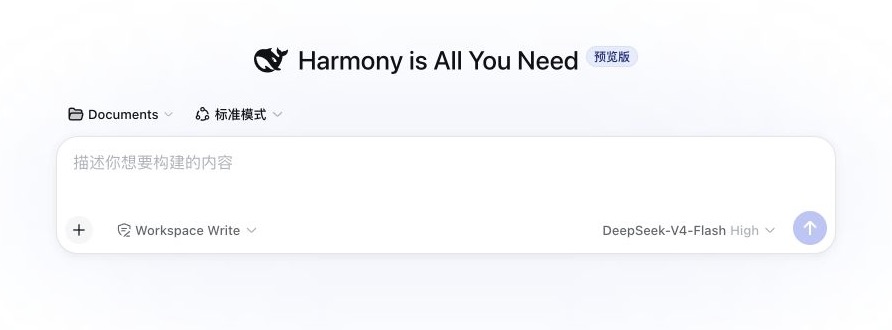
最小 WebUI 示例
下面的 Patch 替换会话客户端中编译后的新会话标题:
const headline = 'Harmony is All You Need'

module.exports = {
  id: 'home-banner',
  description: '替换新会话页标题。',
  target: {
    package: '@deepseek-ai/dsh-client-ui-conversation',
    version: '0.1.0-rc.8',
    file: 'lib/client.js',
  },
  select: 'StringLiteral[text="探索未至之境"]',
  expect: 1,
  apply({ node, sourceFile, edit }) {
    edit.overwrite(node.getStart(sourceFile), node.getEnd(), JSON.stringify(headline))
  },
}
服务与工具 API
插件可以注入 harmony 服务:
export const inject = ['harmony']

export async function apply(ctx) {
  const current = ctx.harmony.profile()
  const snapshot = ctx.harmony.inspect({ package: 'some-dsh-plugin' })
  const result = await ctx.harmony.updateProfile({
    order: current.order,
    disabled: ['my-dsh-plugin/optional-patch'],
  })
}
服务提供:
profile():读取已提交的 profile 快照;updateProfile(input):检查并提交在线更新,返回重载结果;inspect(input?):Patch 状态和修改后的目标快照;
其他本地进程可以使用包导出的 readHarmonyProfile、preflightHarmonyProfileUpdate 和 updateHarmonyProfile。最后一个函数会在 profile 运行时使用 Host 事务,或在 profile 停止时完成校验和原子保存。Profile 运行期间不要直接编辑 harmony.json。Preview 和 Draft 生命周期 API 由 WebUI Studio 提供,不属于 Harmony。